Harvard Resume Template Free Online Builder
The exact Harvard career-office format, pixel-perfect, in a browser editor. Fill in a form, watch the live preview, download the PDF. Free, no watermark, ever. No Word file to wrestle with.
What Is the Harvard Resume Format?
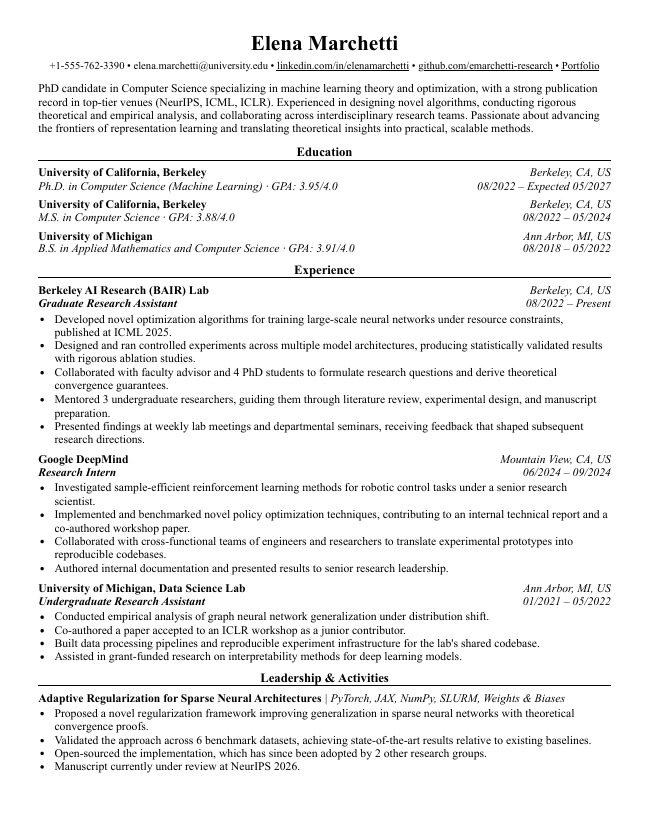
The Harvard resume format is the layout published by Harvard's career office, the Mignone Center for Career Success (formerly the Office of Career Services), in its resume guides for students. It has become shorthand for a specific style: single column, education listed first, bullet-driven descriptions, Times New Roman, and zero graphics.
Sections run Education, then Experience, then Leadership & Activities, then Skills & Interests. The name is centered at the top, section headings are underlined, and everything fits one page. It's conservative by design: the format disappears so the content does the talking. That restraint is exactly why recruiters in finance, consulting, and corporate hiring have trusted the Harvard resume template for decades.
Why Use a Builder Instead of the Word Template?
The official file is a Word document, and Word documents reflow. Open the same .docx on a different machine or Word version and the margins shift, the fonts substitute, and your one-page resume becomes a page and a quarter. The builder renders the Harvard resume format the same way every time, on every device.
- Formatting shifts across machines and Word versions
- Underlined headings and tab stops break when you edit
- One wrong keystroke reflows the whole page
- Font substitution when Times New Roman isn't installed
- Manual work to keep everything on one page
- Every tailored version is another fragile copy
- Structured form editor: the layout can't break
- Instant live preview as you type
- Identical output on every device and browser
- One-click PDF export, free, no watermark
- Works on your phone before a deadline
- Built-in linter to strengthen the content too
Times New Roman, centered name, underlined section headings, education first. The layout matches the career-office original, rendered consistently every time.
Form on the left, letter-size preview on the right. Every keystroke updates instantly, so you always know what the printed page looks like.
One-click export to a print-ready, ATS-safe PDF. No watermark, no branding, no trial limit. This is the differentiator: most builders charge to remove theirs.
Keep the classic order or adapt it: rename Leadership & Activities, add certifications, drag sections around. The Harvard look holds.
Tailor a version per application without duplicating fragile Word files. Each version keeps its own live preview and PDF export.
The editor is responsive. Fix a bullet from your phone an hour before the application closes.
Power users can switch to raw JSON for bulk edits and version-control their resume as data.
After the formatting is done, run the line-by-line linter to catch vague bullets, fluff, and missing metrics.
Your work saves as you type. Close the tab, come back, pick up where you left off.
Skip the formatting fights. Open the Harvard template in the builder →
Is the Harvard Resume Template ATS-Friendly?
Yes. The Harvard resume format is close to the ideal case for applicant tracking systems: a single column read top to bottom, standard section headings a parser recognizes on sight, and no tables, text boxes, graphics, or photos to trip it up. It parses cleanly through Workday, Greenhouse, Lever, and Taleo.
The builder protects that advantage on the file level too: the exported PDF uses real text layers (not an image) in a linear reading order, so the ATS extracts exactly the text the recruiter sees.
No sidebars or multi-column layouts that scramble parsing order. Content reads top to bottom, the way every parser expects.
Education, Experience, Skills. Parsers map these headings to the right fields without guessing.
No icons, skill bars, photos, or tables. Nothing on the page that an ATS could misread or drop.
Who Should Use the Harvard Format?
The Harvard resume template puts Education first, which is exactly right when your degree is your strongest signal. It's the default choice for students and new grads, and it stays the safe pick anywhere conservative formatting is an asset.
- Students and new grads (education-first by design)
- Investment banking and finance applicants
- Consulting applicants (MBB and beyond)
- Corporate, government, and nonprofit roles
- Graduate school and fellowship applications
- Anyone who wants a conservative, recruiter-familiar page
In tech? Compare with Jake's resume template: it's experience-and-projects-first and the community default for software roles. Full breakdown in Jake's Resume vs Harvard: which should you use? →
Harvard Template for Google Docs & Word
Searching for a Harvard resume template for Google Docs or a Word download? Harvard's career office publishes its template as a Word document, and Google Docs recreations circulate online. Both work, with the same caveat: you own the formatting. Underlined headings, right-aligned dates, and one-page fit all depend on tab stops and manual spacing that break as you edit, and the file renders differently across machines.
The builder is the shortcut past all of that: the same Harvard resume format, but the layout is code, not keystrokes. You type content, it handles the typography, and the PDF comes out identical every time. No Word license, no Google account, no download to manage.
Opens a copy of the Harvard resume template directly in Google Docs. Fine as a reference; every edit still risks the tab stops and spacing.
Word file for offline editing. Note: formatting may shift across different machines and Word versions.
Want the Harvard resume format without babysitting a document? Build it online →
The Format Gets You Parsed. The Content Gets You Interviews.
A perfect Harvard resume format with vague bullets is still a rejection. After you export, run your resume through Rejectless's line-by-line feedback: it flags fluff, missing metrics, and credibility risks so the content is as strong as the layout.
Harvard Resume Guides
Deep-dive guides to help you get the most out of the format.
FAQ
Everything you need to know about the Harvard resume builder.
›Is the Harvard resume template free?
Yes. The builder is free to use with unlimited edits and PDF downloads. You pick the Harvard template, fill in the form, and export. There is no trial limit and no paywall on the builder itself.
›Does the free PDF have a watermark?
No. Never, on any template. The PDF you download is clean: no watermark, no footer branding, no 'made with' line. What the recruiter sees is exactly the Harvard format and nothing else.
›Is the Harvard resume format ATS-friendly?
Yes, and that's a big part of why it endures. Single column, standard section headings, no tables, no graphics, no photos. It parses cleanly through Workday, Greenhouse, Lever, and Taleo. Our builder exports the PDF with real text layers in a linear reading order, so the parser reads what the human reads.
›Harvard resume format vs Jake's resume template — which should I use?
Harvard for education-first, general-purpose applications: students, new grads, finance, consulting. Jake's for tech roles where a Projects section carries weight. Read the full comparison in our Jake's Resume vs Harvard guide. Read the comparison →
›Can I download the Harvard resume template as PDF/Word?
The builder exports a print-ready PDF free, and that's the format employers and ATS systems want. We don't export .docx from the builder: Word output reflows across machines, which is exactly the problem the builder exists to solve. If you specifically need the original Word or Google Docs file, you can grab both in the download section above, but expect formatting drift once you start editing.
›Do I need Microsoft Word or Google Docs?
No. Everything happens in your browser: you fill in a structured form, watch a live preview of the Harvard format, and download the PDF. No Word license, no Google account, no fonts to install, no template file to manage.
›Do I need an account to use the builder?
No signup wall. You land directly in the editor and can build and download without creating an account. At download we ask for your email once, to send you a link back to your workspace, and there's a skip button if you'd rather not.
›Is this affiliated with Harvard University?
No. Rejectless is not affiliated with or endorsed by Harvard. We render the resume format popularized by Harvard's career office (the Mignone Center for Career Success), the same way our other builders render Jake's and Deedy's templates.
Build the Harvard Resume Format the Easy Way
The classic career-office layout, rendered pixel-perfect in your browser. Fill in the form, download a clean PDF, then lint the content so every bullet earns its line.