
Build Jake's Resume Online - Pixel Perfect, Zero LaTeX
The clean, single-column template that gets talked about constantly on r/EngineeringResumes. Now editable in a real browser with live preview. No compilation errors. No syntax. Just fill, tweak, download.
What Is Jake's Resume? The Template Every SWE Uses
Origin story. Jake's Resume was created by Jake Gutierrez as a LaTeX template, originally shared on Overleaf and GitHub under the MIT license. What started as one engineer's personal template quickly became the de facto standard for software engineering resumes across the industry.
Why it became the standard. The template exploded in popularity on Reddit — particularly on r/cscareerquestions and r/EngineeringResumes — because it nails every requirement recruiters care about: clean single-column layout, ATS-optimized structure, high information density without visual clutter. When people ask “what resume template should I use?” the answer is almost always “Jake's.”
The template's actual specs. Computer Modern fonts (the LaTeX default), letter paper with custom margins (−0.5in), titlesec for section formatting, and fancyhdr for clean headers. No sidebars. No colors. No icons. Just content arranged with surgical precision.
Who uses it. CS students applying for their first internship. New grads targeting FAANG. Senior engineers with 10+ years who want a clean, no-nonsense format. The template scales from zero experience to staff-level — you just adjust the content.
Why recruiters like it. Predictable structure means faster scanning. Every section is exactly where they expect it. The layout is information-dense without feeling cluttered. And because so many strong candidates use it, recruiters have positive associations with the format itself.
Why Jake's Resume Still Wins in 2026
Jake's Resume became the default SWE template for a reason. It's not flashy. It's not clever. It's simple, scannable, and proven. Recruiters at top tech companies have seen thousands of resumes built on this template — and they keep requesting it because it works.
Single-column layout. Clean hierarchy. No sidebars, icons, or color blocks that confuse ATS parsers or waste recruiter attention. The content does the talking.
Standard heading structure, no tables, no columns, no fancy formatting. Parses cleanly through Lever, Greenhouse, Workday, Taleo, and every other ATS.
The spacing and typography let you pack education, experience, projects, and skills onto one page without it looking like a wall of text. Density without clutter.
Who it's best for
- Software engineers (all levels)
- New grads and CS students
- Experienced engineers switching companies
- Backend, frontend, and full-stack devs
- Anyone applying to FAANG or top-tier startups
- Engineers on r/EngineeringResumes and r/cscareerquestions
The LaTeX Problem (Why Everyone Hates Editing Jake's Resume)
Everyone copies Jake's from Overleaf... then wastes hours fighting compilation errors, font issues, and impossible mobile edits. The template is perfect. The editing experience is a nightmare.
Jake's isn't the only template with this problem. Our LaTeX resume builder covers Deedy and Awesome CV the same way: the LaTeX output, no LaTeX editing.
Came here because Resumake shut down? Jake's is the closest match to its single-column output, and your JSON export imports straight into this editor. Here is how to edit your Resumake resume.
- Compilation errors from a missing brace
- Font rendering differences across systems
- Can't edit on mobile or tablet
- Steep learning curve for non-CS majors
- Version control is painful
- Sharing requires account or PDF export every time
- Visual form editor — zero syntax
- Instant live preview as you type
- Works on any device, any browser
- No compilation, no errors, no waiting
- One-click PDF export, always consistent
- Built-in linter to improve your content too
A Proper GUI That Actually Matches the Original
Not “inspired by” Jake's Resume. Not “similar to.” This is the template — rendered pixel-perfect in a browser with a real editor.
Looks identical to the classic LaTeX template. Same Computer Modern fonts, same spacing, same single-column layout. Recruiters can't tell the difference.
Move Education above Experience. Add a custom section. Remove what you don't need. The template adapts while keeping Jake's clean look.
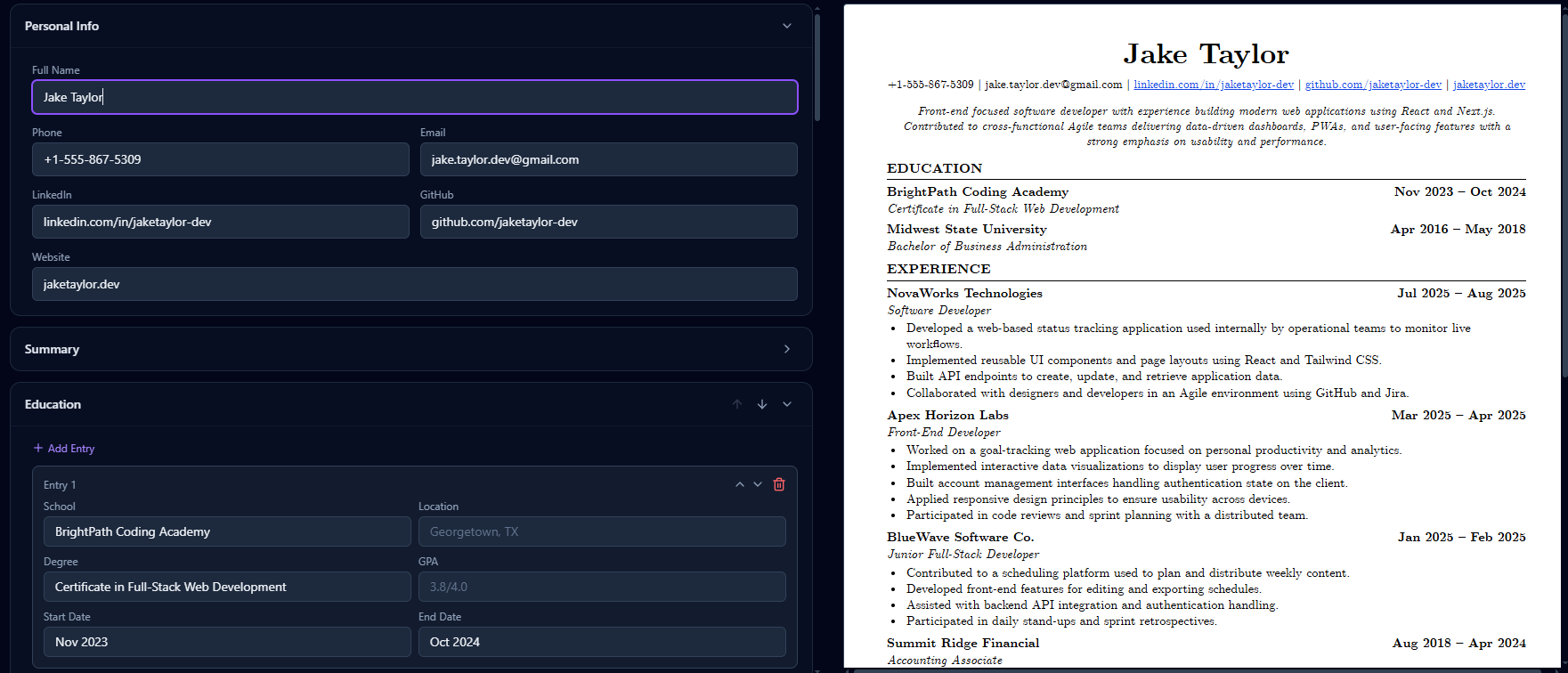
Split-view editor: form on the left, A4 preview on the right. Every keystroke updates instantly. No compile step.
Print-ready and ATS-safe. Real text layers, standard fonts, proper heading hierarchy. Downloads in seconds.
Edit as many times as you want. Download as many PDFs as you need. No watermarks. No trial limits. Free.
Update your resume from your phone before a deadline. The responsive editor works on any screen size.
Power users can switch to raw JSON editing for bulk changes. Copy-paste entire sections, version control your resume as code.
One button sends your resume to Rejectless's line-by-line linter. Great formatting + strong content = interviews.
Your work saves automatically as you type. Close the tab, come back later, pick up where you left off. No lost progress.
How It Works
Four steps. Five minutes. One perfect resume.
Click 'Start Building Free.' No signup required. You land in the split-view editor immediately.
Type into the form fields. Header, education, experience, projects, skills — all structured for you. Live preview updates with every keystroke.
Drag sections to reorder. Add custom sections if needed. Switch to JSON mode for bulk edits. Everything stays pixel-perfect.
Export your resume as a clean, ATS-safe PDF. Then hit 'Lint with Rejectless' to make sure the content is as strong as the formatting.
Step 4 is the one people skip. Formatting done? Great. Now make the bullets actually good.
Example Output
Here's what a finished Jake's Resume looks like from the builder. Identical to the LaTeX original.
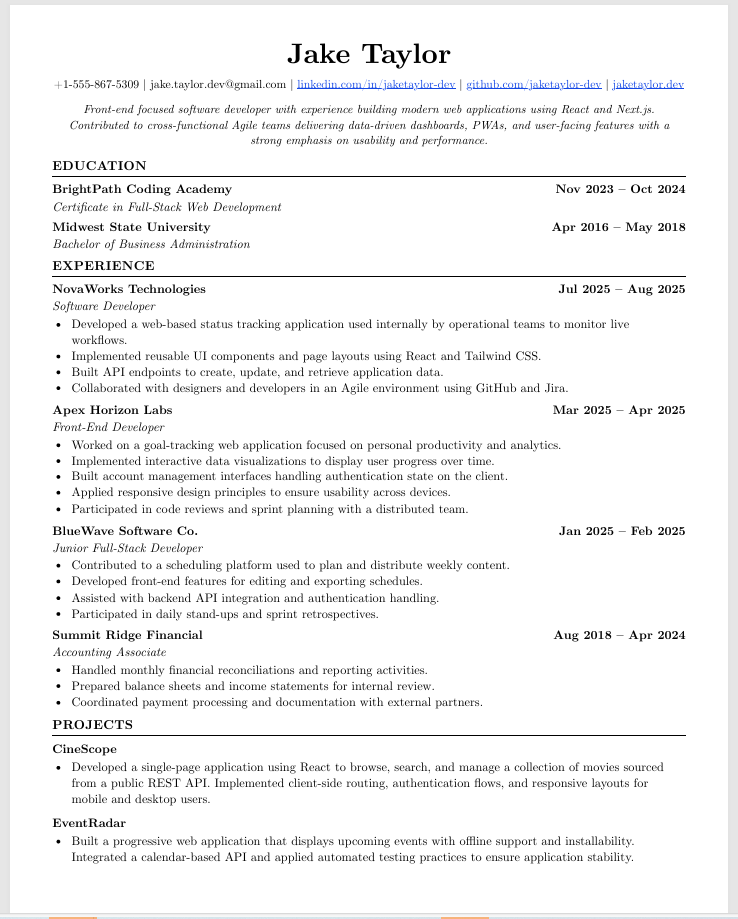
Same template. No LaTeX required.
This is the exact output from the Rejectless builder. Same Computer Modern fonts. Same spacing. Same section hierarchy. Identical to what you'd get from Overleaf — minus the compilation headaches.
- Clean PDF with real text layers (not an image)
- Passes ATS parsers: Lever, Greenhouse, Workday
- Consistent output across all devices and browsers
- One-page format with optimized density
Download Jake's Resume Template
Grab the template in whatever format works for you. Or skip the files and use the visual builder instead.
Blank template ready to fill in. The most requested format — open in any PDF reader and use as a reference.
Full copyable LaTeX source code. Paste into Overleaf or your local TeX editor and compile.
Google Docs version of Jake's Resume. Make a copy and edit directly in your browser. Approximate match.
Word template for offline editing. Note: formatting may shift across different machines and Word versions.
Want pixel-perfect output without fighting file formats? Use the visual builder instead →
Jake's Resume LaTeX Code (Copy to Overleaf)
The complete LaTeX source for Jake's Resume template. Copy and paste into Overleaf or your local editor.
Show full LaTeX source code
%-------------------------
% Resume in LaTeX
% Author : Jake Gutierrez
% Based off of: https://github.com/sb2nov/resume
% License : MIT
%------------------------

\documentclass[letterpaper,11pt]{article}

\usepackage{latexsym}
\usepackage[empty]{fullpage}
\usepackage{titlesec}
\usepackage{marvosym}
\usepackage[usenames,dvipsnames]{color}
\usepackage{verbatim}
\usepackage{enumitem}
\usepackage[hidelinks]{hyperref}
\usepackage{fancyhdr}
\usepackage[english]{babel}
\usepackage{tabularx}
\input{glyphtounicode}

%----------FONT OPTIONS----------
% sans-serif
% \usepackage[sfdefault]{FiraSans}
% \usepackage[sfdefault]{roboto}
% \usepackage[sfdefault]{noto-sans}
% \usepackage[default]{sourcesanspro}

% serif
% \usepackage{CormorantGaramond}
% \usepackage{charter}

\pagestyle{fancy}
\fancyhf{} % clear all header and footer fields
\fancyfoot{}
\renewcommand{\headrulewidth}{0pt}
\renewcommand{\footrulewidth}{0pt}

% Adjust margins
\addtolength{\oddsidemargin}{-0.5in}
\addtolength{\evensidemargin}{-0.5in}
\addtolength{\textwidth}{1in}
\addtolength{\topmargin}{-.5in}
\addtolength{\textheight}{1.0in}

\urlstyle{same}

\raggedbottom
\raggedright
\setlength{\tabcolsep}{0in}

% Sections formatting
\titleformat{\section}{
  \vspace{-4pt}\scshape\raggedright\large
}{}{0em}{}[\color{black}\titlerule \vspace{-5pt}]

% Ensure that generate pdf is machine readable/ATS parsable
\pdfgentounicode=1

%-------------------------
% Custom commands
\newcommand{\resumeItem}[1]{
  \item\small{
    {#1 \vspace{-2pt}}
  }
}

\newcommand{\resumeSubheading}[4]{
  \vspace{-2pt}\item
    \begin{tabular*}{0.97\textwidth}[t]{l@{\extracolsep{\fill}}r}
      \textbf{#1} & #2 \\
      \textit{\small#3} & \textit{\small #4} \\
    \end{tabular*}\vspace{-7pt}
}

\newcommand{\resumeSubSubheading}[2]{
    \item
    \begin{tabular*}{0.97\textwidth}{l@{\extracolsep{\fill}}r}
      \textit{\small#1} & \textit{\small #2} \\
    \end{tabular*}\vspace{-7pt}
}

\newcommand{\resumeProjectHeading}[2]{
    \item
    \begin{tabular*}{0.97\textwidth}{l@{\extracolsep{\fill}}r}
      \small#1 & #2 \\
    \end{tabular*}\vspace{-7pt}
}

\newcommand{\resumeSubItem}[1]{\resumeItem{#1}\vspace{-4pt}}

\renewcommand\labelitemii{$\vcenter{\hbox{\tiny$\bullet$}}$}

\newcommand{\resumeSubHeadingListStart}{\begin{itemize}[leftmargin=0.15in, label={}]}
\newcommand{\resumeSubHeadingListEnd}{\end{itemize}}
\newcommand{\resumeItemListStart}{\begin{itemize}}
\newcommand{\resumeItemListEnd}{\end{itemize}\vspace{-5pt}}

%-------------------------------------------
%%%%%%  RESUME STARTS HERE  %%%%%%%%%%%%%%%%%%%%%%%%%%%%

\begin{document}

%----------HEADING----------
\begin{center}
    \textbf{\Huge \scshape Jake Ryan} \\ \vspace{1pt}
    \small 123-456-7890 $|$ \href{mailto:jake@su.edu}{\underline{jake@su.edu}} $|$
    \href{https://linkedin.com/in/jake}{\underline{linkedin.com/in/jake}} $|$
    \href{https://github.com/jake}{\underline{github.com/jake}}
\end{center}

%-----------EDUCATION-----------
\section{Education}
  \resumeSubHeadingListStart
    \resumeSubheading
      {Southwestern University}{Georgetown, TX}
      {Bachelor of Arts in Computer Science, Minor in Business}{Aug. 2018 -- May 2021}
    \resumeSubheading
      {Blinn College}{Bryan, TX}
      {Associate's in Liberal Arts}{Aug. 2014 -- May 2018}
  \resumeSubHeadingListEnd

%-----------EXPERIENCE-----------
\section{Experience}
  \resumeSubHeadingListStart
    \resumeSubheading
      {Undergraduate Research Assistant}{June 2020 -- Present}
      {Texas A\&M University}{College Station, TX}
      \resumeItemListStart
        \resumeItem{Developed a REST API using FastAPI and PostgreSQL to store data from learning management systems}
        \resumeItem{Developed a full-stack web application using Flask, React, PostgreSQL and Docker to analyze.)}
        \resumeItem{Explored ways to visualize GitHub collaboration in a classroom setting}
      \resumeItemListEnd

    \resumeSubheading
      {Information Technology Support Specialist}{Sep. 2018 -- Present}
      {Southwestern University}{Georgetown, TX}
      \resumeItemListStart
        \resumeItem{Communicate with managers to set up campus dependencies}
        \resumeItem{Assess and troubleshoot computer problems brought by students, extract data}
    \resumeItemListEnd
  \resumeSubHeadingListEnd

%-----------PROJECTS-----------
\section{Projects}
    \resumeSubHeadingListStart
      \resumeProjectHeading
          {\textbf{Gitlytics} $|$ \emph{Python, Flask, React, PostgreSQL, Docker}}{June 2020 -- Present}
          \resumeItemListStart
            \resumeItem{Developed a full-stack web application using with Flask serving a REST API with React as the frontend}
            \resumeItem{Implemented GitHub OAuth to get data from user's repositories}
            \resumeItem{Visualized GitHub data to show collaboration}
            \resumeItem{Used Celery and Redis for asynchronous tasks}
          \resumeItemListEnd
      \resumeProjectHeading
          {\textbf{Simple Paintball} $|$ \emph{Spigot API, Java, Maven, TravisCI, Git}}{May 2018 -- May 2020}
          \resumeItemListStart
            \resumeItem{Developed a Minecraft server plugin to entertain kids}
            \resumeItem{Published plugin to websites gaining 2K+ downloads and an average 4.5/5-star review}
            \resumeItem{Implemented continuous delivery using TravisCI to build the bytes of the plugin upon new a]am release}
          \resumeItemListEnd
    \resumeSubHeadingListEnd

%-----------TECHNICAL SKILLS-----------
\section{Technical Skills}
 \begin{itemize}[leftmargin=0.15in, label={}]
    \small{\item{
     \textbf{Languages}{: Java, Python, C/C++, SQL (Postgres), JavaScript, HTML/CSS, R} \\
     \textbf{Frameworks}{: React, Node.js, Flask, JUnit, WordPress, Material-UI, FastAPI} \\
     \textbf{Developer Tools}{: Git, Docker, TravisCI, Google Cloud Platform, VS Code, Visual Studio, PyCharm, IntelliJ, Eclipse} \\
     \textbf{Libraries}{: pandas, NumPy, Matplotlib}
    }}
 \end{itemize}

%-------------------------------------------
\end{document}
Don't want to deal with LaTeX? Use our visual builder instead →
Jake's Resume: Every Way to Build It (Compared)
There are many ways to create Jake's Resume. Here's how they stack up.
| Feature | Overleaf (LaTeX) | jakesresume.com | Google Docs | Word Template | Rejectless Builder |
|---|---|---|---|---|---|
| No LaTeX required | download | ||||
| Live preview | |||||
| Pixel-perfect match | close | ||||
| Mobile editing | basic | ||||
| Content feedback / linting | |||||
| ATS-safe PDF export | N/A | depends | |||
| Free | |||||
| Drag & reorder sections | manual | manual | |||
| Multiple resume versions | projects | manual | manual | ||
| Built-in bullet improvement |
Wondering how Jake's stacks up against Deedy, Harvard, and the rest? Compare the best software engineer & developer resume templates → Leaning education-first instead? The same editor has a Harvard resume builder, and we compared Jake's vs Harvard resume template head to head.
Great Template + Strong Content = Interviews
A pixel-perfect template is useless if your bullets say “Built scalable systems” and “Worked with various technologies.” The template gets your resume past ATS. The content gets you past the human.
For worked walkthroughs on adjacent roles, see our AI engineer resume, machine learning resume, and senior data engineer resume pages, with annotated, line-by-line breakdowns.
Use the Jake's Resume builder to get the formatting right.
Run Rejectless to flag weak bullets, fluff, and missing metrics.
Jake's Resume Guides
Deep-dive guides to help you get the most out of the template.
10 Jake's Resume Mistakes That Get Software Engineers Ghosted
Using Jake's Resume but still not hearing back? These 10 common mistakes silently kill your applications. Fix them in minutes with our free builder and linting tool.
Read guideJake's ResumeJake's Resume vs Deedy's Resume: Battle of the Two Most Popular CS Templates
Jake's Resume vs Deedy's Resume — the definitive comparison. Single-column vs two-column, ATS safety vs content density, minimalism vs modern design. Which template should you use in 2026?
Read guideJake's ResumeJake's Resume Template: Complete Guide (2026)
The definitive guide to Jake's Resume template. Learn the history, how to customize every section, common mistakes to avoid, and tips for every experience level.
Read guideJake's ResumeJake's Resume Google Docs Template (Free Download)
Free Google Docs version of Jake's Resume template with download link. Learn how to use it, formatting tips, and when a dedicated builder might be the better choice.
Read guideJake's ResumeJake's Resume vs. Overleaf: Why You Don't Need LaTeX
A direct comparison between using Overleaf/LaTeX and a visual builder for Jake's Resume. Pros, cons, and when each approach makes sense.
Read guideResume TemplatesBest Resume Template for Software Engineers (2026)
Compare the best resume templates for software engineers in 2026. Jake's Resume, Harvard, Deedy, Awesome CV, and others rated on ATS compatibility, design, and content space.
Read guideComparisonsJake's Resume vs Harvard Template: Which to Use? (2026)
Jake's vs Harvard resume template compared: ATS results, industry fit, layout. Tech vs finance rule of thumb, plus open either template in a free editor.
Read guideJake's ResumeJake's Resume for New Grads: How to Fill It When You Have No Experience
A practical guide for CS students and new graduates using Jake's Resume template. Learn what to put in each section when you have little or no work experience.
Read guideReal feedback from people who used it
This is the best resume template I’ve found for tech roles. It’s designed around what tech recruiters care about, and the web-based builder is much smoother and more intuitive than other resume builders or working directly in LaTeX. I also really appreciate being able to use it without signing up and download my resume as many times as I want for free. I’d highly recommend it.


I had a CV that had landed me interviews and jobs before, but this time around I hit a streak of rejections and ghosting. A friend suggested Rejectless, I cleaned up my CV a lot, prepared multiple versions myself and applied. This time it wasn't that difficult because the builder just made it so easy, and now I've got 2 interviews lined up in the next week and a half. So yeah, probably a mix of me and the CV, but I'll take the win. GG!
This is a brutal review tool. I don't think most people will expect the feedback it gives - it's harsh but worth it. The builder is truly one of the most well designed resume tools I've used. I can easily make multiple versions of resumes by mix and matching
 r/resume-coverletter-tips
I'm a senior developer, so I never had difficulty putting my work down on paper but the difficult part has always been building a resume for a specific role. Of course, AI tailoring just changes the words and can be spotted, but this Resume Builder offers vault linking, which makes creating resumes an effortless task. I don't have to manually duplicate the resume and add or remove things. All my frontend, backend, and cloud related experiences are organised and all I do is consciously mix and match. Trust me, this really helps!
r/resumes
I usually don't look for a jump, but unfortunately sometimes you can be let go even when you're good at what you do. Back in the day the rule was to have different resumes focusing on different domains, and that works. But now it's best if you can highlight the experience and projects relevant to the role you're applying for, even if it's as simple as moving them up or removing things that aren't relevant, because you don't want to confuse the recruiter. I used to do this manually with a master resume, duplicating and tweaking until I stumbled on this platform. It's not rocket science, the design just makes it so easy to link different domains and the developer really thought it through. Would recommend to anyone applying for a variety of roles who's struggling to target their resume.

Absolutely Brilliant. I run coding bootcamps and recommended this tool to all my students. The ones who use it always score more interviews than the ones don’t. It’s a great tool for any developer who is job hunting.
Frequently Asked Questions
Everything you need to know about the Jake's Resume builder.
›Is this the real Jake's Resume template?
Yes. The output is a pixel-perfect match of the original Jake's Resume LaTeX template that circulates on Overleaf and r/EngineeringResumes. Same fonts, same spacing, same section hierarchy. The only difference: you don't touch LaTeX.
›Is the output ATS friendly?
Yes. The PDF is generated with real text layers, not images. Standard fonts, clean heading hierarchy, no tables or columns that confuse parsers. It passes common ATS parsers like Lever, Greenhouse, and Workday.
›Do I need an account to use it?
No. You can start building immediately without signing up. An account is only needed if you want to save your resume to the cloud and come back later.
›How does this compare to Overleaf?
Overleaf requires you to write LaTeX. This builder gives you a visual form editor with live preview — same output, zero compilation errors, no syntax to learn. Edit on any device, including mobile.
›Can I use this for free forever?
Yes. The builder itself is completely free with unlimited edits and PDF downloads. There are no watermarks, no trial limits, no paywalls on the builder.
›Is the output identical to the LaTeX version?
Visually identical. Same Computer Modern-style fonts, same margins, same section formatting. We match the original template spec down to spacing and font weights.
›Can I create multiple resumes?
Yes. You can create and manage multiple resume versions — tailored for different roles or companies. Each one gets its own live preview and PDF export.
›What is 'Lint with Rejectless'?
After you build your resume, you can run it through Rejectless's line-by-line linter. It flags vague bullets, fluff, missing metrics, and credibility risks — so your formatting AND your content are both strong.
›Why not just use a Word template?
Word versions of Jake's Resume inevitably break. Fonts shift, spacing changes across machines, and the output rarely matches the original. This builder renders the template consistently every time.
›Can I reorder sections or add custom ones?
Yes. Drag to reorder sections, add custom sections, and the live preview updates instantly. The template adapts while keeping the clean, single-column Jake's Resume look.
›Where did Jake's Resume template come from?
Jake's Resume was created by Jake Gutierrez and shared as an open-source LaTeX template on Overleaf and GitHub under the MIT license. It gained massive popularity on Reddit communities like r/cscareerquestions and r/EngineeringResumes, becoming the most recommended resume template for software engineers.
›Is Jake's Resume the best template for software engineers?
It's the most widely used and recommended template in the SWE community. The Reddit consensus on r/EngineeringResumes and r/cscareerquestions consistently points to Jake's as the safest, most ATS-friendly choice. It's clean, information-dense, and recruiters at top tech companies are familiar with the format.
›Can I use Jake's Resume for internships?
Absolutely. Jake's Resume is especially popular among CS students applying for internships. The template works well even with limited experience — the Projects section lets you showcase personal and class projects alongside any work experience you have.
›Jake's Resume vs Harvard resume template — which is better?
Both are solid choices, but they serve different audiences. Jake's Resume is purpose-built for tech roles — single-column, ATS-optimized, with a Projects section that software engineers need. The Harvard template is more general-purpose and better suited for non-technical roles. For SWE, data science, or any engineering position, Jake's is the stronger choice.
›How do I convert my existing resume to Jake's format?
The easiest way is to open our builder and paste your content into the structured form fields. The builder handles all formatting automatically — header, education, experience, projects, and skills sections are all pre-structured to match Jake's template. No manual formatting required.
›Does Jake's Resume work with Google Docs?
There are Google Docs approximations of Jake's Resume, but they don't match the original perfectly — fonts, spacing, and section formatting will differ from the LaTeX version. Our builder produces a pixel-perfect match to the original template without requiring LaTeX or Google Docs workarounds.
Stop Fighting LaTeX. Build Your Jake's Resume the Easy Way.
Same template. Same output. Zero compilation errors. Fill in the form, get a perfect PDF, then lint the content to make sure every bullet hits. Free forever.
REJECTLESS L.L.C. · 1209 Mountain Road Pl NE, Ste R, Albuquerque, NM 87110 · support@rejectless.app