
Build Deedy's Resume Online – Modern Design, Zero LaTeX
The modern, clean-typography template that took over GitHub and r/EngineeringResumes. Now editable in a real browser with live preview. No compilation errors. No font packages. Just fill, tweak, download.
What Is Deedy's Resume? The Modern Template Engineers Love
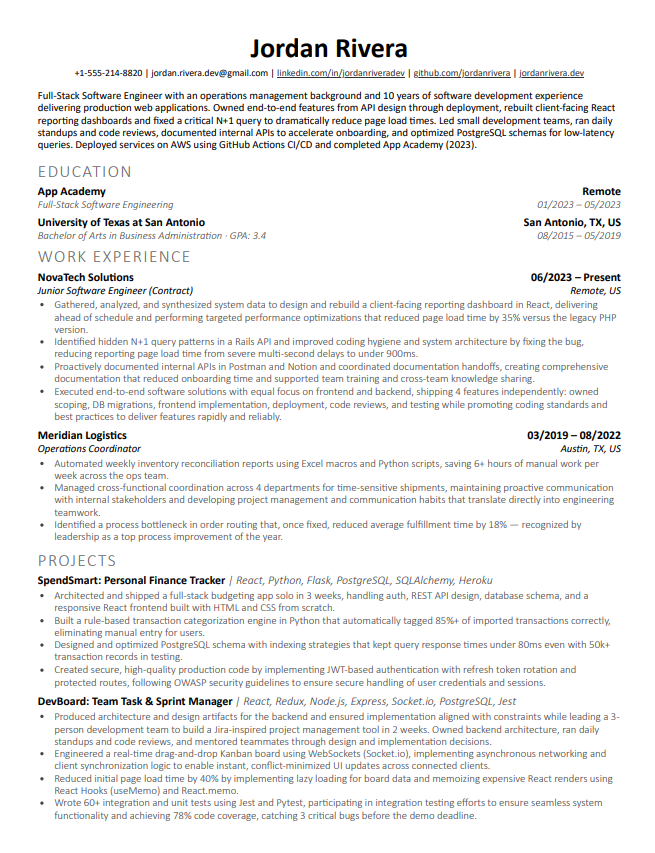
Origin story. Deedy's Resume was created by Debarghya Das (known online as “Deedy”) and shared as an open-source LaTeX template on GitHub and Overleaf. With thousands of GitHub stars and forks, it became one of the most popular resume templates in the developer community.
Why it stands out. Unlike traditional resumes with bland fonts, Deedy's uses modern typography (Lato and Raleway) with colored section headers and clean rule lines. The result is a polished, contemporary look that stands out while remaining professional. It's visually distinctive without being flashy — the design signals “engineer who cares about craft.”
The template's actual specs. Lato for body text, Raleway for headers, custom titlesec formatting with colored rule lines and clean section dividers. Modern typography that breaks from the traditional Computer Modern look while keeping a single-column, ATS-friendly structure.
Original vs. modern Deedy. The original Deedy layout split content into a narrow sidebar and a wide main column, which parses poorly in ATS software because multi-column text gets read out of order. The modern Deedy that circulates today has moved to a single-column structure, which is why it's become the defacto version of the template. That's the layout this builder renders.
Who uses it. CS students, software engineers, data scientists, and product managers who want a modern resume that fits dense technical content onto one page. Especially popular among engineers at top tech companies who have multiple projects and publications to showcase.
Why recruiters notice it. The modern typography is immediately recognizable. It communicates that the candidate is detail-oriented and technically capable — someone who chose a template that balances style with substance. Recruiters at tech companies see this template regularly and associate it with strong candidates.
Why Deedy's Resume Still Wins in 2026
Deedy's Resume became a GitHub sensation for a reason. Modern typography, colored section headers, and a polished single-column layout that stands out. Clean design. And it still turns heads in a stack of resumes.
Lato and Raleway fonts with colored section headers instantly set your resume apart from the sea of Times New Roman and Computer Modern. A contemporary look that says “I care about details.”
Lato and Raleway fonts with colored section headers give your resume a clean, modern look. Instantly recognizable in a sea of Times New Roman and Computer Modern.
Single-column layout with standard heading hierarchy and real text layers. Parses cleanly through Lever, Greenhouse, Workday, and every other major ATS platform.
Who it's best for
- Software engineers who want a modern look
- CS students with projects and coursework to showcase
- Engineers with dense technical experience
- Data scientists and ML engineers
- Anyone who wants more content on one page
- Candidates applying to top-tier tech companies
The LaTeX Problem (Why Everyone Hates Editing Deedy's Resume)
Everyone forks Deedy's from GitHub... then spends hours fighting font installation errors, custom class files, and XeLaTeX compilation failures. The design is gorgeous. The editing experience is painful.
Deedy isn't alone here. Our LaTeX resume builder covers Jake's and Awesome CV the same way: the LaTeX output, no LaTeX editing.
- XeLaTeX required — doesn't compile with pdflatex
- Custom font packages (Lato, Raleway) fail to install
- Custom .cls file breaks with content changes
- Can't edit on mobile or tablet
- Custom .cls file adds complexity on top of LaTeX
- Overleaf free tier can timeout on compilation
- Visual form editor — zero syntax
- Instant live preview as you type
- Works on any device, any browser
- No compilation, no font errors, no waiting
- One-click PDF export, always consistent
- Built-in linter to improve your content too
Looks identical to the classic Deedy LaTeX template. Same Lato and Raleway fonts, same spacing, same colored section headers. Recruiters can't tell the difference.
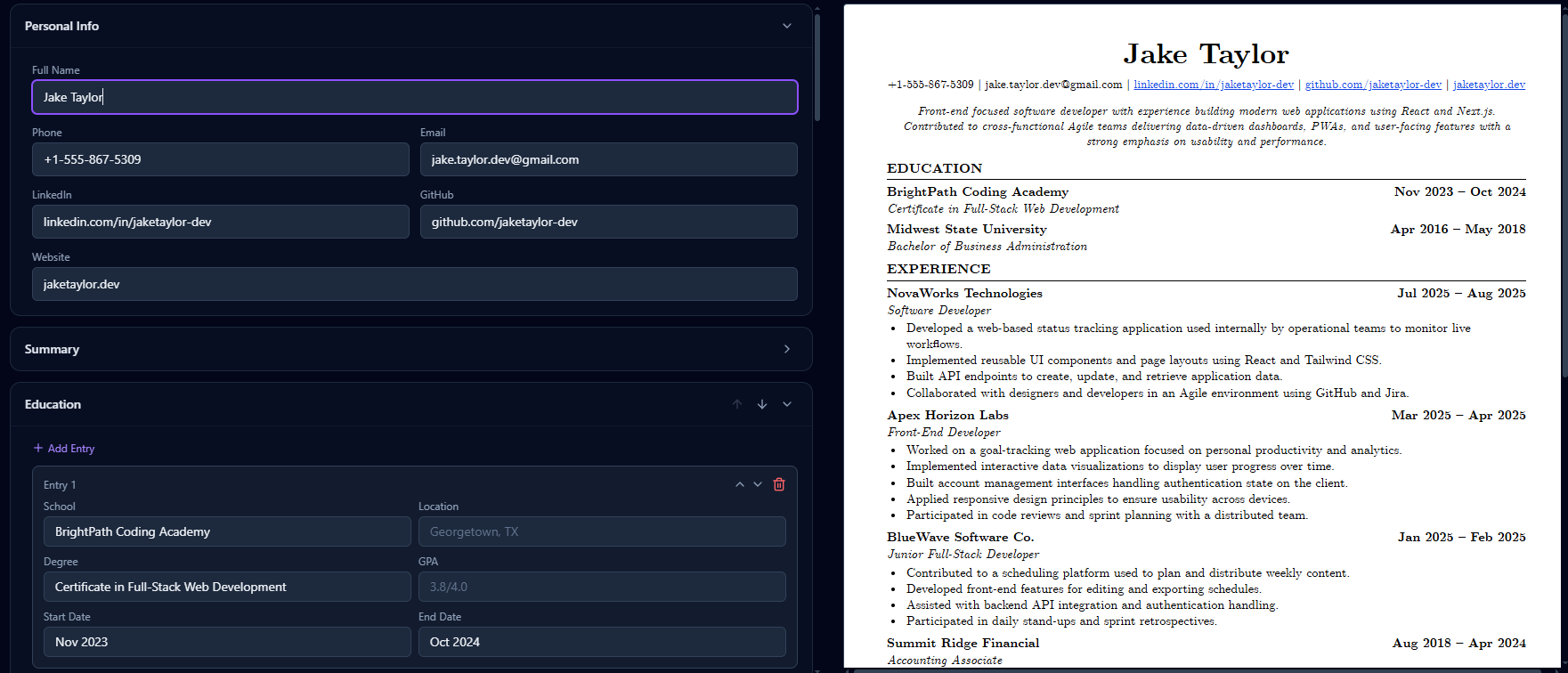
Move Education above Experience. Add a custom section. Remove what you don't need. The template adapts while keeping Deedy's clean, modern look.
Split-view editor: form on the left, A4 preview on the right. Every keystroke updates instantly. No compile step.
Print-ready and ATS-safe. Real text layers, proper reading order, correct heading hierarchy. Downloads in seconds.
Edit as many times as you want. Download as many PDFs as you need. No watermarks. No trial limits. Free.
Update your resume from your phone before a deadline. The responsive editor works on any screen size.
Power users can switch to raw JSON editing for bulk changes. Copy-paste entire sections, version control your resume as code.
One button sends your resume to Rejectless's line-by-line linter. Great formatting + strong content = interviews.
Your work saves automatically as you type. Close the tab, come back later, pick up where you left off. No lost progress.
Deedy's Resume Guides
Deep-dive guides to help you get the most out of the template.
Deedy Resume Template: Complete Guide (2026)
The definitive guide to the Deedy Resume template. Learn the history behind Debarghya Das's iconic two-column LaTeX template, why its ATS compatibility is fatally low, and how the modern single-column Deedy preserves the design identity while actually passing automated screening.
Read guideDeedy ResumeDeedy Resume Is Outdated — Here's What to Use Instead (2026)
The Deedy Resume template served its era brilliantly — but the era changed. ATS adoption went from niche to 97%+ of Fortune 500, recruiters scan in 6 seconds, and the template has no content guidance. Here's the full progression from original Deedy to modern alternatives that actually work.
Read guideJake's ResumeJake's Resume vs Deedy's Resume: Battle of the Two Most Popular CS Templates
Jake's Resume vs Deedy's Resume — the definitive comparison. Single-column vs two-column, ATS safety vs content density, minimalism vs modern design. Which template should you use in 2026?
Read guideFrequently Asked Questions
Everything you need to know about the Deedy Resume builder.
›Is this the real Deedy Resume template?
Yes. The output is a pixel-perfect match of the original Deedy Resume LaTeX template created by Debarghya Das. Same single-column layout, same Lato and Raleway fonts, same section styling. The only difference: you don't touch LaTeX.
›Is the output ATS friendly?
Yes. The PDF is generated with real text layers, not images. Standard fonts, clean heading hierarchy, and proper reading order. It passes common ATS parsers like Lever, Greenhouse, and Workday.
›Do I need an account to use it?
No. You can start building immediately without signing up. An account is only needed if you want to save your resume to the cloud and come back later.
›How does this compare to Overleaf?
Overleaf requires you to write LaTeX and deal with custom font packages. This builder gives you a visual form editor with live preview — same output, zero compilation errors, no syntax to learn. Edit on any device, including mobile.
›Can I use this for free forever?
Yes. The builder itself is completely free with unlimited edits and PDF downloads. There are no watermarks, no trial limits, no paywalls on the builder.
›Is the output identical to the LaTeX version?
Visually identical. Same Lato and Raleway fonts, same spacing, same colored section headers and rule lines. We match the original template spec down to font weights and margins.
›Can I create multiple resumes?
Yes. You can create and manage multiple resume versions — tailored for different roles or companies. Each one gets its own live preview and PDF export.
›What is 'Lint with Rejectless'?
After you build your resume, you can run it through Rejectless's line-by-line linter. It flags vague bullets, fluff, missing metrics, and credibility risks — so your formatting AND your content are both strong.
›Why not just use a Word template?
Word versions of Deedy's Resume inevitably break. Custom fonts shift, spacing changes across machines, and the output rarely matches the original. This builder renders the template consistently every time.
›Can I reorder sections or add custom ones?
Yes. Drag to reorder sections, add custom sections, and the live preview updates instantly. The template adapts while keeping the clean Deedy look.
›Where did Deedy's Resume template come from?
Deedy's Resume was created by Debarghya Das and shared as an open-source LaTeX template on GitHub and Overleaf. It gained massive popularity in the CS community for its modern typography and clean design, becoming one of the most forked resume templates on GitHub.
›Is Deedy's Resume good for software engineers?
Absolutely. It's one of the most popular templates in the SWE community alongside Jake's Resume. The modern typography and clean layout make it ideal for engineers with multiple projects and technical skills to showcase.
›Can I use Deedy's Resume for internships?
Yes. Deedy's Resume is popular among CS students applying for internships at top tech companies. The modern layout lets you showcase projects, coursework, and skills effectively even with limited work experience.
›Deedy's Resume vs Jake's Resume — which is better?
Both are excellent single-column choices for tech roles. Deedy's uses modern fonts (Lato/Raleway) and colored section headers — it's more visually distinctive and contemporary. Jake's uses Computer Modern fonts — it's more traditional and conservative. Choose Deedy's if you want a modern, polished look; choose Jake's for a classic, minimalist approach.
›How do I convert my existing resume to Deedy's format?
The easiest way is to open our builder and paste your content into the structured form fields. The builder handles all formatting automatically — header, education, experience, projects, and skills sections are all pre-structured to match Deedy's template.
›Does the modern formatting cause ATS issues?
No. Our builder generates the PDF with real text layers and proper heading hierarchy, so ATS parsers read it correctly. The single-column layout with standard fonts parses cleanly through Lever, Greenhouse, Workday, and every other major ATS.
Stop Fighting XeLaTeX. Build Your Deedy Resume the Easy Way.
Same template. Same output. Zero compilation errors. Fill in the form, get a perfect PDF, then lint the content to make sure every bullet hits. Free forever.
REJECTLESS L.L.C. · 1209 Mountain Road Pl NE, Ste R, Albuquerque, NM 87110 · support@rejectless.app