
LaTeX Resume Builder — the LaTeX look without writing LaTeX
Pick Jake's, Deedy, or Awesome CV. Fill in a form, watch the typeset preview update live, download the PDF. No packages, no compile errors, no account.
Choose a LaTeX resume template
Three classic LaTeX templates, rendered in the browser with the same fonts and spacing as the originals. Every one opens in the editor with example content already in place, so you can see the layout before you type a word.
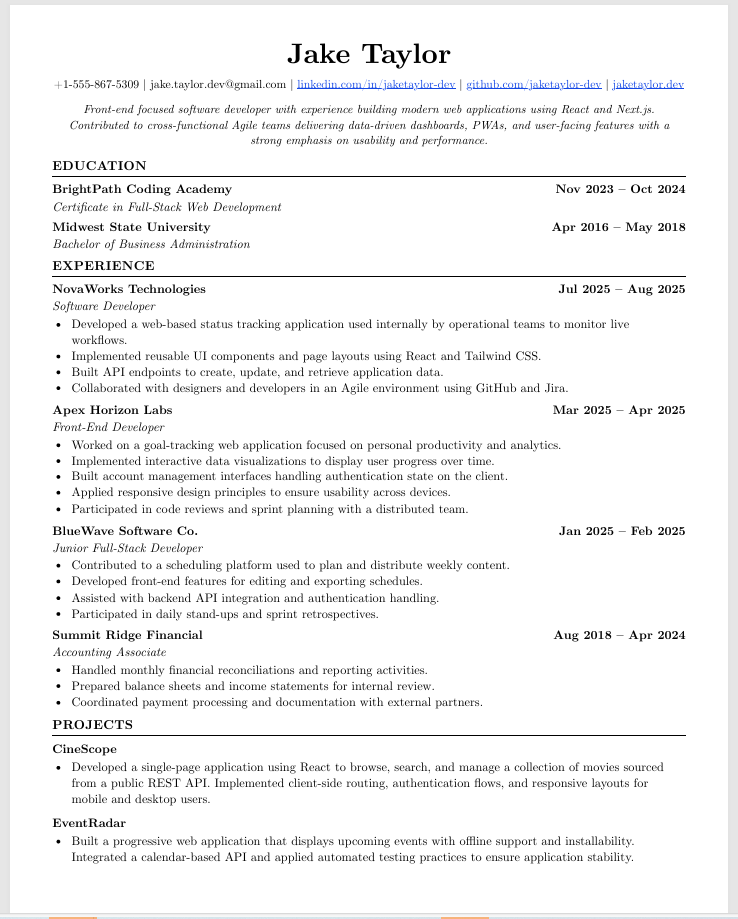
The r/EngineeringResumes default. Single column, Computer Modern fonts, dense without looking crammed. Descends from the sb2nov template.
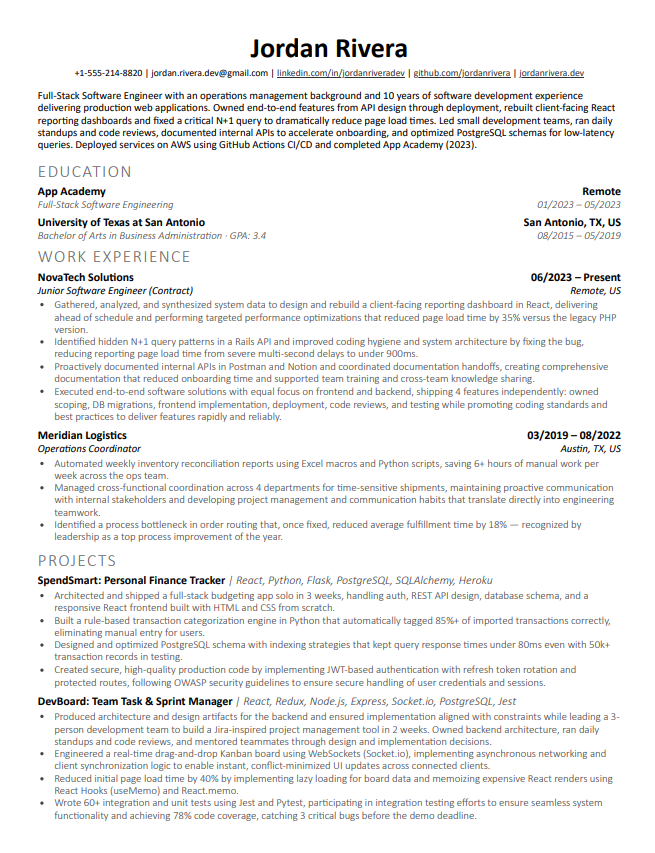
The original Deedy template is two-column, which parses badly in most ATS systems. Modern Deedy reworks the same typography into a single column for that reason: the visual identity, fully ATS compatible.
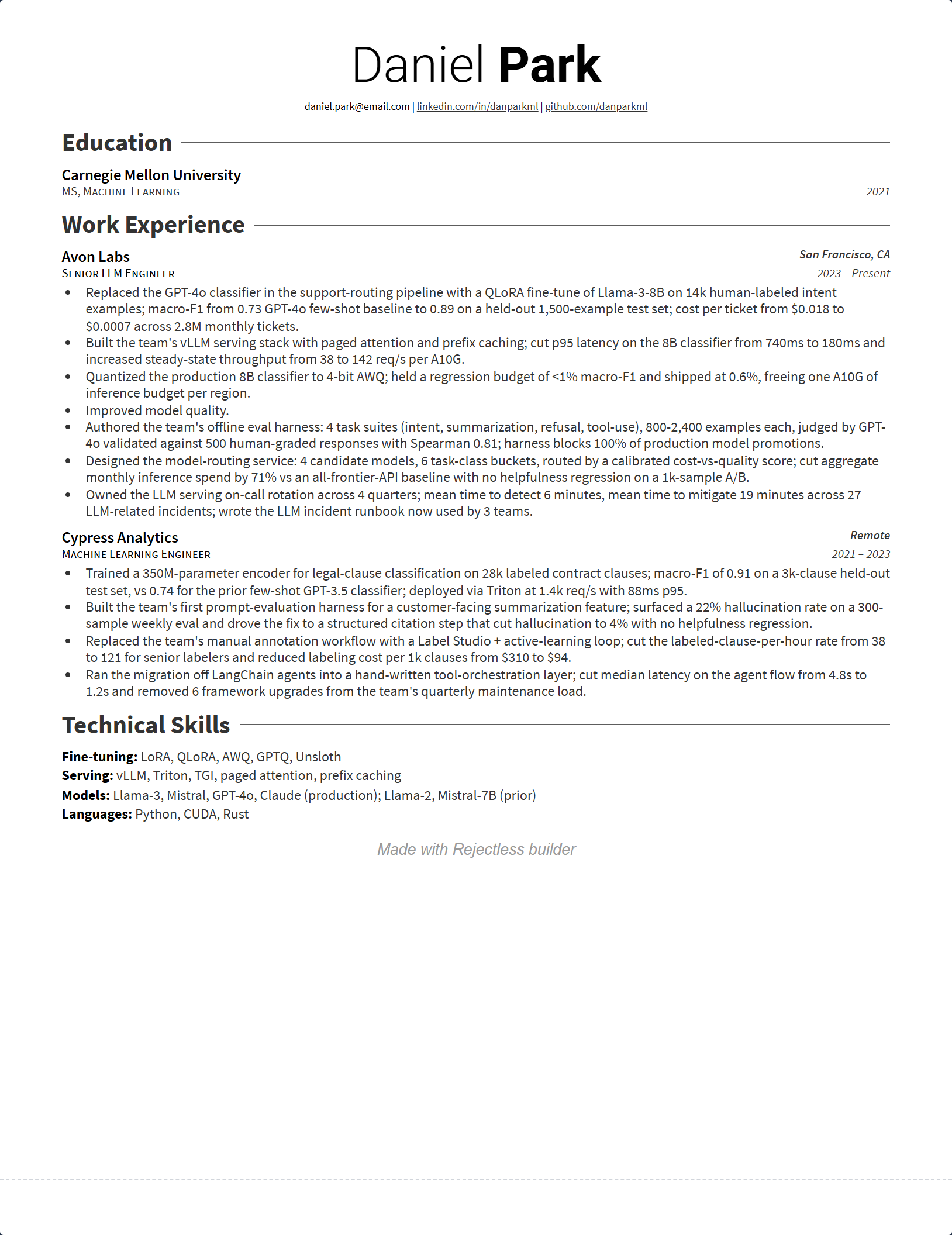
The LaTeX classic with the bold name header and ruled sections. On Overleaf it needs XeLaTeX and its own class file; here it's a form.
Looking for sb2nov? We don't offer it yet, but Jake's is its direct descendant: same single-column structure, same information density, refined spacing. For a side-by-side on ATS safety and design, see the template comparison.
Why not just use Overleaf?
If you want to write LaTeX, use Overleaf. It's the best LaTeX editor there is, and if you already maintain your resume as a .tex file you enjoy tinkering with, nothing here will change your mind.
This builder exists for the other group: people who chose a LaTeX template because the output looks sharp, not because they wanted a relationship with a typesetting language. If you've ever opened a resume template just to change a job title and ended up debugging the document instead, this is the part of the workflow we removed.
One missing brace and the whole document fails with “Undefined control sequence” at line 148. Usually at 11pm, right before an application deadline. Here there is no compile step: the preview is always valid.
“File fontawesome5.sty not found.” Templates assume packages your setup doesn’t have, and fixing that means learning your TeX distribution’s package manager. This builder ships the fonts with the template.
Deedy and Awesome CV require XeLaTeX; compile them with pdfLaTeX and you get errors or the wrong fonts, and nothing tells you why. Here the engine question doesn’t exist.
Fixing a typo in raw LaTeX from a phone browser is miserable, and recruiters don’t wait for you to get back to a desk. This editor is responsive and works on any screen.
The honest summary: Overleaf gives you full control of the source and every package in the TeX ecosystem. This gives you the three templates above, a form, and a PDF that matches the original. Pick based on which of those you actually need.
What you get (and what you don't)
Before you invest ten minutes in any tool, you should know exactly where its edges are. Here are ours.
- A real text-layer PDF. Not an image, not a screenshot of a render. ATS parsers read it the same way a human does.
- Pixel-matched fonts and spacing. Each template is reproduced against the original LaTeX output, down to margins and font weights.
- Live preview on every keystroke. What you see is the final page, not an approximation.
- All templates free, no watermark. Jake's, Modern Deedy, and Awesome CV all export a clean PDF at no cost, no account.
- JSON Resume export and import. Export your resume as JSON Resume, or import a Resumake export directly, no retyping.
- Editing from any device, including a phone. Same document, same output.
- No .tex source export. If you need the .tex file, use the Overleaf links on each template page and maintain it there. This tool is for people who want the PDF.
- No custom packages or macros. You can reorder sections, add custom ones, and adjust content, but you can't redefine the template with arbitrary LaTeX. If your resume needs tikz, you need Overleaf.
Frequently Asked Questions
Everything people ask before switching from Overleaf, Resumake, or raw LaTeX.
›Is a LaTeX resume ATS-friendly?
It depends on how the PDF was produced. Compiled LaTeX PDFs can parse badly in applicant tracking systems: ligatures turn 'fi' into a single glyph, some templates output text in a non-linear order, and two-column layouts confuse parsers. Jake's template mitigates this with pdfgentounicode, but plenty of LaTeX resumes still come out garbled on the ATS side. This builder generates the PDF with real text layers and a standard reading order, so what the recruiter sees is also what the parser reads.
›Can I build a LaTeX resume without installing anything?
Yes. Nothing to install, no TeX distribution, no packages to download. The editor runs entirely in your browser: you fill in a form on the left and watch the typeset preview update on the right. It works on any device, including your phone.
›Can I make a LaTeX resume without Overleaf?
Yes. Overleaf is a LaTeX editor, so it assumes you want to write LaTeX. If you only want the finished look of a LaTeX template, this builder gives you the same output through a visual form. No document class, no packages, no compile step.
›Is there a free LaTeX resume generator?
Yes, this is one. The generator is free to use with no account and no time limit. Every template, Jake's, Modern Deedy, and Awesome CV, exports a clean PDF with no watermark.
›Do I need an account?
No. You land directly in the editor and can build and download without signing up. At download we ask for your email once, to send you a link back to your workspace, and there is a skip button if you would rather not. An account only matters if you want your resume saved in the cloud across devices.
›Can I download the .tex source?
No. This tool produces the PDF, not the LaTeX source. If you need the .tex file, use the Overleaf links on each template page and compile it yourself. This builder is for people who want the output without maintaining the source.
›Can I import my Resumake JSON?
Yes. Resumake exported the JSON Resume schema, and the editor reads it directly: choose Import JSON Resume in the import screen, pick your .json file, and confirm the mapping it shows you. If you only kept the PDF, the same screen parses that instead. There is a full walkthrough on the Resumake editor page.
›Can I edit a LaTeX resume on my phone?
With this builder, yes. The editor is responsive and works on any screen size, so you can fix a bullet from your phone before a deadline. Editing raw LaTeX on a phone, whether in Overleaf or a text editor, is close to impossible.
›Which LaTeX template should I pick?
If you're unsure, pick Jake's. It's the default recommendation on r/EngineeringResumes, it's single-column and ATS-safe, and it fits the most content per page. Modern Deedy has the strongest visual identity and is single-column too, so it's ATS-safe by design. Awesome CV is the boldest of the three and best where a human reads your resume first.
LaTeX Resume Guides
Deep-dive guides on templates, formatting, and content.
The LaTeX look, five minutes from now
Open the editor, pick a template, fill in the form. When the formatting is done, run the built-in linter so the content is as strong as the typography.